For freelance software developers
Stop scope creep on your freelance software projects.
Get paid for every piece of work you do.
Keptance turns a client brief into clear requirements, a price and a proposal you can send. Once you record the agreement, each new request you paste in is assessed against it and can become a numbered change order, so extra work goes on record instead of being quietly absorbed.
Open beta. Free plan, no credit card required.
Client brief
"We need a booking site for our clinic. Patients book and cancel online, get SMS reminders and pay a deposit by card. Front desk needs an admin panel."
Ask for it as a change request, or take it on knowingly.
Client, on Tuesday
Can you also add loyalty points? Should be quick.
Assessed against the agreement
Outside the agreement
+3 days · 19.500 ₺
Written down
Request accepted · in change order 1
160.000 ₺ → 179.500 ₺ · 29–31 days
Keptance at a glance
- What is Keptance?
- Keptance is a web app for freelance software developers. It takes one software project from the client's first brief to the last change order, and keeps the agreement in one place.
- Who is it for?
- Freelance software developers who write their own proposals and manage their own clients. Each workspace has one member.
- What problem does it solve?
- Scope creep: vague requirements and “can you also add…” requests that turn into work nobody agreed to pay for.
- How does it work?
- AI drafts the questions and the work breakdown, and the proposal is built from them. With a day rate set, the price is calculated in code; without one, you see a labelled AI market estimate. You review everything and edit the proposal, then record the agreement and measure later requests against it.
- Why not a doc and a spreadsheet?
- They hold what you typed. They don't flag a stale estimate or a task added outside the agreement, or turn a client's message into a numbered change order.
- What won't it do?
- It doesn't message your client for you, take payments or give legal advice. Pro isn't on sale yet.
What is scope creep, and what does it cost a freelance developer?
Scope creep is work growing past what was agreed, one small request at a time. Without a sales or project management team behind you, every gap in the brief and every request after the handshake becomes your problem, and one ambiguous brief is enough to have you working for free.
The brief hides what it doesn't say
A vague requirement today is an argument with the client tomorrow — and by then the work is already half done.
A gut-feel quote is a liability
One bad estimate doesn't just cost you days — it costs you the client's trust in your next one.
After the handshake, extra work is unbilled by default
Without a written record, every "can you also add..." quietly becomes work you did for free, and an overrun nobody tracked comes out of your own days.
How does Keptance work? Follow one project from brief to final change order
The same example project, at the points where scope is won or lost.
Win the project
Before anyone has agreed to anything.
Step 1: Settle the scope
Paste the brief. It becomes requirements, and the questions that would otherwise surface mid-build. Answer them, mark one to ask the client, or leave it for the AI to fill as an unconfirmed assumption.
7 requirements · 5 open questions
3 resolved1 waiting on the client1 assumedDeposit payment: assumed card via iyzico. It stays unconfirmed until you confirm or change it.
Step 2: Price the plan
A work breakdown (WBS): the project split into phases and tasks with day ranges, built without waiting for every answer. Questions still with the client stay out of it. With a day rate set, the price is calculated in code; without one, you see a labelled AI market estimate. Change a decision and the plan is flagged as out of date; revising it keeps the tasks the change doesn’t touch.
Discovery and setup2–3 daysBooking and calendar7–9 daysReminders and deposits6–8 daysAdmin panel6–7 daysTesting and handover3–4 days24–31 days144.000 ₺ – 214.000 ₺Step 3: Send the proposal
The proposal is built from the plan: phases, exclusions, prerequisites, questions still open with the client, and price. Edit it inline and export it as a PDF (Word on Pro). The first export marks it as sent, which you can undo, or you can mark it by hand. You send it yourself.
Proposal · Clinic booking app
Open items listed1Not included3 itemsPrice band from the plan144.000 ₺ – 214.000 ₺Sent 11 OctPDF
Keep what you agreed
From the handshake to the day the project closes.
Step 4: Record the agreement
“Agreement reached” is your own record of what was agreed. It freezes the scope, the proposal and the agreed price as of today, and new plan versions don’t move that price. Later requests are measured against it.
Agreement reached · 12 Oct
Agreed price160.000 ₺Agreed duration26–28 daysFrozen7 requirements, proposalStep 5: Deliver with warnings
Track tasks and time. A task you add by hand with no requirement is flagged as outside the agreement, and a task is flagged once logged time passes its estimate. Today gathers what needs a decision across a workspace's projects.
Booking calendar2.5 of 4 daysPatient remindersPast its estimate · 2.5 of 2 daysLoyalty pointsNot in the agreementTime logged past an estimate shows on your Today screen. A task with no requirement asks you to link one, call it project-wide work or make it a change request.
Step 6: Turn extra work into change orders
Paste a client's request and AI assesses it against the agreement. If it's out of scope you get days, plus a price when a day rate is set. Decide on it, then put what you accepted into a numbered change order. Accepted work adds up as protected revenue.
“Can you also add loyalty points? Should be quick.”
Outside the agreement+3 days · 19.500 ₺Change order 1AcceptedExtra work recorded this month19.500 ₺Step 7: Close and calibrate
Close the project and the time you tracked pre-fills the actual days, which you can edit. On Pro, once a workspace has three completed projects, later estimates are corrected against them.
Closed · completed
Logged30 daysEstimated27–34 daysBooking and calendar12% over
What the app looks like
These are the app's real screens. The clinic booking project and its AI text were written for this example, not produced by a live AI run.
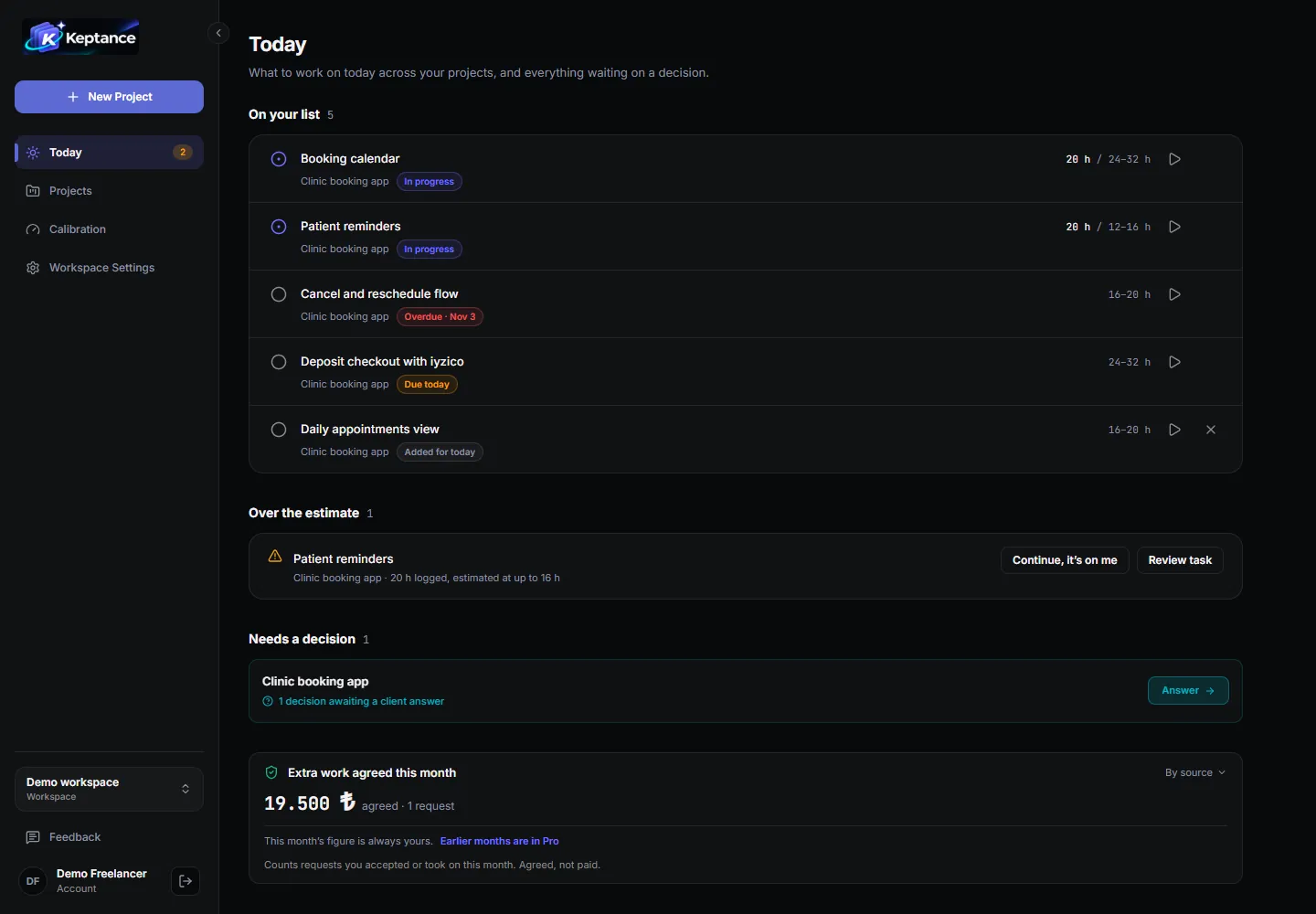
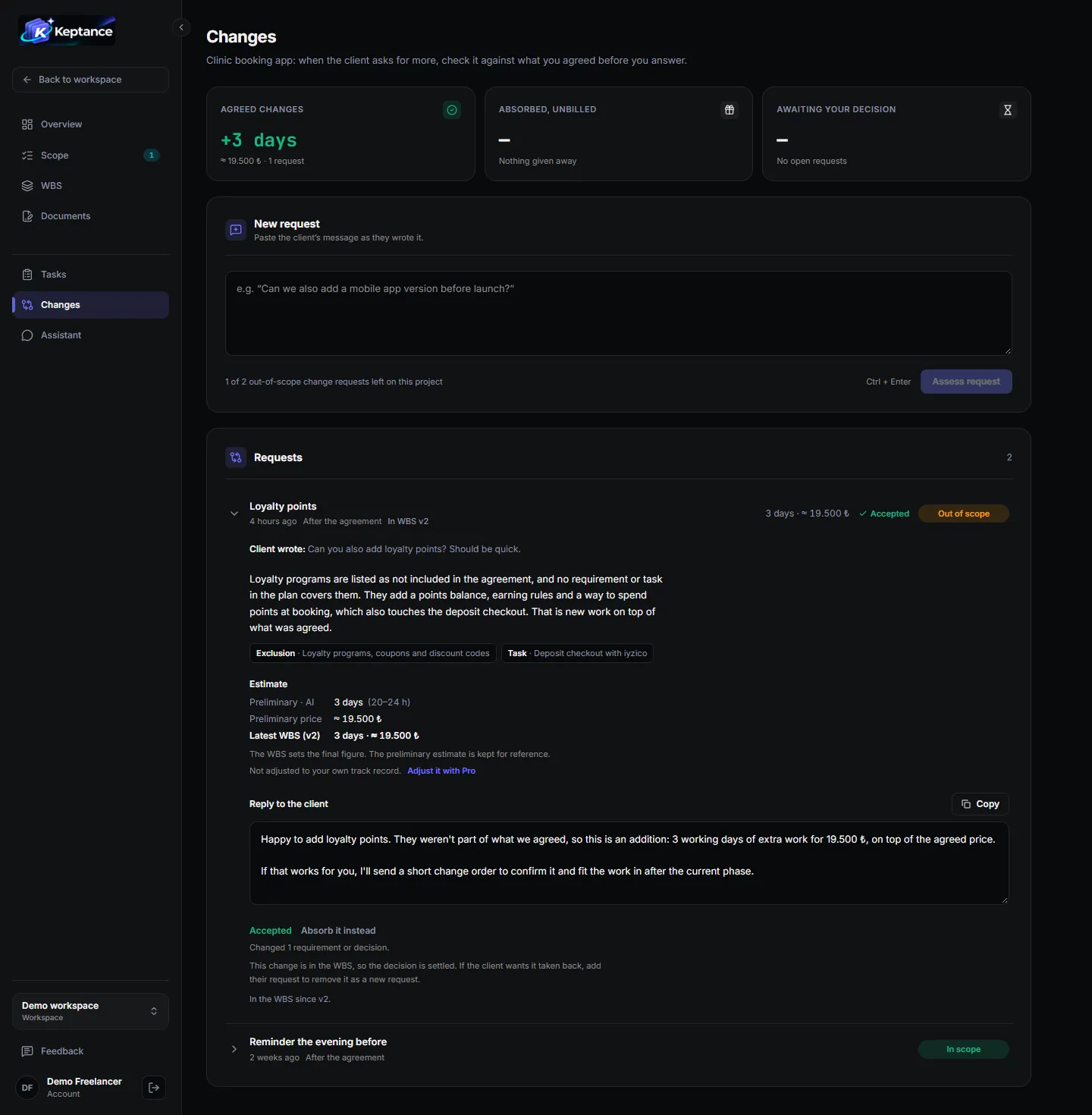
A written record at every stage, from brief to final change order
Keptance builds you a paper trail you can point to when a client pushes back, before the agreement and after it.
See it before it bites you
Ambiguous points the AI finds in the brief come up as single, answerable questions: settled in a click, marked to ask the client, or saved as an assumption until you confirm it.
- Questions ranked by severity (HIGH / MEDIUM / LOW)
- Scope-creep risks flagged before pricing, not after
An estimate you can stand behind
Keptance splits the work into phases and tasks with effort ranges: a work breakdown, or WBS. With a day rate set, the price is calculated in code; without one, you see a labelled AI market estimate. On Pro, the project's day total is calibrated against your own completed projects. Change a decision upstream and the plan is flagged as out of date.
- Task-level effort ranges and one complexity rating for the project
- Version history, with past versions compared by phase, days and price
A proposal with its limits in writing
A client-ready document with explicit exclusions, prerequisites and the questions still open with the client, and a price tied to a defined scope, so a later request has something to be measured against.
- Pricing in TRY, USD or EUR
- Export as PDF (Word on Pro); the first export marks it as sent
The agreement stays fixed
“Agreement reached” is your own record: there's no client signature in the product. It freezes the scope, the proposal and the agreed price, and new plan versions don't move that price. From then on an edit to Scope becomes a request you decide on.
- Later requests are measured against the agreement
- Undo it until the first change request
Warnings, not surprises
Track tasks and time. A task you add by hand with no requirement is flagged as outside the agreement, and a task is flagged once logged time passes its estimate. You decide what to do while the work is under way.
- A timer, or time entered by hand
- A Today screen for the projects in a workspace
Assessed, priced, written down
Paste the client's message. AI assesses it against the agreement and shows its reasoning. If it's out of scope you get days, plus a price when a day rate is set, and what you accept can go into a numbered change order you export and send yourself.
- Accepted work adds up as protected revenue: a record, not money received
- Work you take on free is shown apart; reductions don't count
Estimates corrected by your own track record
On Pro, once a workspace has three completed projects, the day total of each new estimate is corrected against its last ten: how long the work actually took, not how long a generic model thinks it should. You can see how each correction is worked out.
- Calibration is a deterministic calculation in code and not an input to the AI's estimates, so it stays explainable.
- Track time on your tasks and closing a project starts from what you logged, so the record builds itself while you deliver.
- Delivered projects before adopting Keptance? Import up to ten as calibration history.
Calibration is part of Pro, which isn’t on sale yet.
Example workspace history
Discovery & Setup
est. 3–5 days · actual 4 days
Core Build
est. 9–13 days · actual 15 days
QA & Handoff
est. 2–3 days · actual 2 days
Start free. Pro adds more room but isn't on sale yet.
Free takes one project at a time from brief to final change order. Pro gives you more room as your work grows. Both have daily ceilings on AI use.
Free
One project in delivery at a time, from the first brief to the last change order.
- Scope questions, work breakdown and pricing, proposal, task tracking and the Today screen
- Projects in delivery at once: 1
- New projects a month: 1
- WBS builds a month: 2
- Change requests a month: 3
- Proposal and change order export: PDF, with “Prepared with Keptance”
- Protected revenue: This month
- Closed projects: Listed for 60 days
- Assistant messages a month: 5
- AI help a month (suggestions, custom answers, mini-chat): 40
- Workspaces: 1
- Estimate calibration and past-project import: Pro only
Pro
More room as your work grows.
- Scope questions, work breakdown and pricing, proposal, task tracking and the Today screen
- Projects in delivery at once: No plan limit
- New projects a month: 5
- WBS builds a month: 20
- Change requests a month: 15
- Proposal and change order export: PDF without the footer line, and Word
- Protected revenue: Every month, by project
- Closed projects: Always listed
- Assistant messages a month: 100
- AI help a month (suggestions, custom answers, mini-chat): 300
- Workspaces: 3
- Estimate calibration and past-project import: Included
Agency
For small agencies scoping as a team.
- Everything in Pro
- Team workspaces
Free guides and templates for freelance developers
Useful even if you never sign up: guides and free templates for the parts of freelance work that decide whether a project pays.
Frequently asked questions
Is Keptance free?
The Free plan is open to everyone and doesn't need a credit card. It takes one project at a time from brief to change order, and its limits, such as new projects a month, are on the pricing page. Pro is shown at a planned price but isn't on sale yet.
What kind of briefs does Keptance work with?
Software project briefs, pasted as text, up to 30,000 characters. Keptance first checks that the text is a software brief it can work with, then starts on the scope. Briefs for other kinds of project aren't supported.
Can I edit the generated work breakdown and proposal?
The proposal, yes: you edit it section by section until the agreement freezes it. The work breakdown isn't edited by hand: it changes through revisions, and each one is saved as a new version. Keptance drafts, you finalize.
What happens if I change a decision after the plan is generated?
Keptance flags the plan as out of date against your decisions and offers to recalculate it, so you can see an estimate no longer matches before you send it.
What if my assumptions turn out to be wrong?
Answers the AI fills in are saved as unconfirmed assumptions and stay on the project until you confirm or change them. They aren't printed in the proposal: only questions waiting on the client appear there. Change one and the plan is flagged as out of date; revising it keeps the tasks the change doesn't touch.
What happens when a client adds work later?
Paste their message into the project. AI assesses it against the agreement and your exclusions. If it's out of scope you get days, plus a price when a day rate is set, and you accept it, decline it or take it on free. Accepted work can go into a numbered change order you export and send yourself.
Does Keptance contact my client?
No. Keptance never emails or messages your client. You copy a suggested message or export a document and send it yourself. Your client has no account or access in the app.
What formats can I export to?
Proposals and change orders export as a PDF on Free, with a small footer line. Pro adds Word files and leaves the footer line off your PDFs.
Can I buy Pro now?
Not yet. Pro isn't on sale. Free covers the flow from brief to change order with tighter limits; calibration, past-project import and Word export are Pro. The Get Pro button tells us you'd want more.
Quote with the scope in writing. Keep it on record until it's delivered.
Start with one project, and see what the agreement is worth the first time a client asks for more.